



Lise Skjold Andersen
Contact | Find us
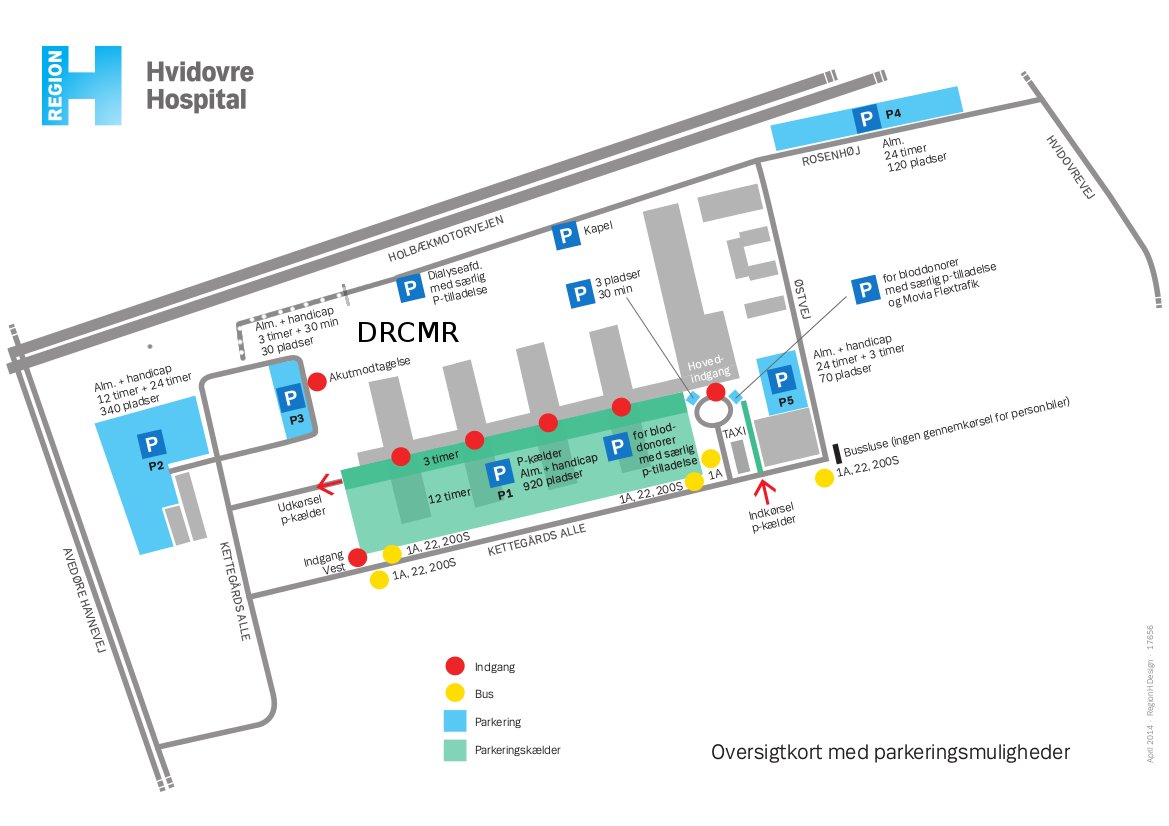
The Centre is located in Copenhagen, Denmark at Hvidovre Hospital in separate buildings just north of Center C. Parking area is in the basement or at some of the other P-areas. Alternatively, taxis can bring you directly to the DRCMR (click for route). A Taxi ride from Copenhagen Airport to Hvidovre Hospital takes approximately 15 minutes and costs around DKK 270 (mostly highway).
From the basement: Take stairs/lift one level up to "ambulatorieetagen", and follow signs towards sections 334, 339 and 340, pass the reception, go to the end of the corridor and take the stairs or the lift one floor up to MR-Forskning. From the parking west of the hospital (P2): Walk parallel to the motorway on Nordre Hospitalsvej up the hill, where you will find Pavillion 7 at no. 13. Ring the bell near the white nitrogen tank.
Getting to the hospital by public transport: Please consult rejseplanen (in English): Click HERE.
It takes around an hour to get from the Copenhagen Airport to Hvidovre Hospital. The simplest way is to catch the metro (Metro M2) from the airport to “Forum St”.
From “Forum St.” you can catch BUS 1A direction Hvidovre Hospital to Hvidovre Hospital. You can find more details on rejseplanen (in English). Click HERE.
The clinical section and reception is located on the ground floor ("ambulatorieetagen"). Click on the pdf icon to see the map: 
Popular destinations:
The DRCMR Conference Room
Getting to the DRCMR conference room in dept. 340A at Hvidovre Hospital (MR-afdelingen):
- By car/bike: Park in Center C in the basement under the hospital. Walk one floor up (ambulatorieetagen) and follow signs to the MR department.
- By bus: Get off at the hospital main entrance. Stay at the ground level and go towards the MR-department located in Center C.
Ten meters before you reach the waiting area of the MR-department: Turn right through the glass door and left immediately after. Knock or go to the waiting area of the MR-department if the door is locked.
The DRCMR meeting room in Pavillion 7
You may get to the DRCMR meeting room in Pavillion 7 via the back entrance (easiest if coming by car) or through the hospital.
Via the back entrance:
- Parking is mainly available outdoor east and west of the hospital (near the emergency ward, "Akutmodtagelsen", and at Østre Hospitalsvej/Nordre Hospitalsvej). From either of these places, walk parallel to the motorway up the hill, where you will find Pavillion 7. The meeting room is located on the 1st floor (entrance in the east end).
Getting to the DRCMR meeting room through the hospital:
- By car/bike: Park in Center C in the basement under the hospital. Walk one floor up (ambulatorieetagen) and follow signs to the MR department ("MR-afdelingen"). Go past the waiting area to the end of the corridor, and take the elevator or stairs one level up to DRCMR.
- By bus: Get off at the hospital main entrance. Stay at the ground level and go towards the MR-department located in Center C. Follow directions above.
Hartwig Siebner's offices
Hartwig Siebner has two offices at Hvidovre Hospital:
- At the DRCMR: From the waiting area of the MR department, follow the corridor to the dead end and take the elevator and stairs up one floor where DRCMR is located. Call a contact, or ring the bell to get to the offices. From other locations, follow the directions to the DRCMR meeting room in Pavillion 7 above. Hartwig's office is just opposite this.
- The FBE management: Top floor of Center D. Elevators and stairs above basement with parking.
Karam Sidaros' office
From the waiting area of the MR department, follow the corridor to the dead end and take the elevator and stairs up one floor where DRCMR is located. Call a contact, or ring the bell to get to the offices. From other locations, follow the directions to the DRCMR meeting room in Pavillion 7 above. Karam’s offices are just 5 metres down the hall on the opposite site.
The waiting area of the MR department: See above

Impaired functional brain connectivity in multiple sclerosis: non-invasive assessment with resting-state functional MRI

7 Tesla MR Centre for Human Use - A National Infrastructure
Mapping maladaptive motor connectivity underlying peak-of-dose dyskinesia in Parkinson's disease: functional MRI study
Human brain maturation in children and adolescents: links to developing cognitive and emotional functions and the role of genetic and environmental factors

Linking brain maturation in children and adolescents to the development of emotional functions: the role of genetic and environmental factors
Vurdering af eksperimentelle skizofreni modeller med MR billeddannelse – relevans i forhold til klinikken